How To Build A Crud Application Using Nodejs, Express And Drizzle Orm

Full stack developer passionate about creating functional and interactive web applications and technical writer that just want to share knowledge gained while building web applications
CRUD stands for create, read, update, and delete. These are core actions a user can perform within an application. CRUD
API is an api that allows users to perform basic data operations create, read, update, and delete. These four operations
are essential in managing data within an application.
Drizzle ORM is a lightweight headless TypeScript / JavaScript object relational mapper (ORM) for SQL databases.
It provides a type-safe way to interact with SQL databases and provides SQL-like syntax for building schemas and writing
queries.
Prerequisites
The main focus of this article is to look at drizzle orm, before you start reading, basic knowledge of
- Typescript
- Nodejs
- Express js
- Postman (for making API request)
is required
Why use drizzle ORM ?
- SQL like syntax: drizzle's SQL like syntax makes it straightforward for developers who already know SQL to adopt. "If you know SQL, you know drizzle."
- Database support: drizzle supports all the popular SQL database engines, including the serverless SQL databases such as Neon, Vercel postgres, Supabase, etc.
- Type safety: drizzle provides a type-safe way to write schemas and queries, making it simple to avoid errors when querying and catching any error early if there's one.
- Lightweight: drizzle is designed to be lightweight, this contributes a lot to its efficient performance.
- Serverless ready: drizzle is designed to be serverless ready, it works well in all JavaScript runtimes and even browsers
Getting started
To learn about Drizzle ORM, we'll build a simple CRUD API, which is a simple "banking" system using Node.js, Express.js, and Drizzle ORM. The simple banking system is just a CRUD API, which allows a user to sign up with an email, username, and password. The user can then transact with other registered users by sending or receiving money.
Setting up a Node.js application
First, create a folder and open the folder in your code editor, then open your terminal and run the code below to set
up package.json with default selections.
npm init -y
The next step is to install the necessary dependencies. For this application, you need express and dotenv.
npm i express dotenv
To use TypeScript, we need to install TypeScript and other packages as dev dependencies. This would make it easier for us to use TypeScript in a Node application.
npm i -D typescript tsx @types/express @types/node
Inside the package.json file, set the main to index.ts, which would be the entry point of the application. Also,
create
an index.ts file at the root of the application.
{
  "main": "index.ts",
  "scripts": {
    "dev": "tsx watch index.ts"
  }
}
Also, define the dev command to watch for changes using tsx.
Setting up drizzle ORM
To set up Drizzle in the Node.js project, first install the Drizzle package and the node-postgres package since the database that will be used is postgres. Note that drizzle uses specific database drivers for each database.
npm i drizzle-orm pg
The drizzle kit is also installed for more functionalities like generating schema, running migrations, running drizzle kit studio, e.t.c. The drizzle kit is installed as a dev dependency.
npm i -D drizzle-kit
Defining schema
First, create a folder named db, this is where all the database-related stuff is going to live. Then created
a schema.ts
file inside the db folder. This application will have three tables, the user table, the profile table and
the transactions table. For the user table, this is what it'd look like.
import {
    integer,
    pgTable,
    varchar,
    text,
    timestamp,
    serial,
} from "drizzle-orm/pg-core";

export const userTable = pgTable("users", {
    id: serial("id").notNull().primaryKey(),
    balance: integer("balance").notNull().default(100),
    username: varchar("username", {length: 255}).notNull(),
    email: varchar("email", {length: 255}).notNull().unique(),
    password: text("password").notNull(),
    createdAt: timestamp("createdAt").notNull().defaultNow(),
    updatedAt: timestamp("updatedAt").notNull().defaultNow().$onUpdate(() => new Date()),
});
The user table has seven columns:
idis an auto-increment serial which is the primary key.balanceis an integer which has a default value of 100.usernameandemailare character varying, which has a length of 255. Theemailcolumn is unique, meaning that two of the same emails can't be in the database.passwordhas a data type of text.createdAtandupdatedAtare timestamps that default to the current time when a user is created on the database.
One of the first things to notice is that the schema definition looks very similar to raw SQL. The data types are
imported from drizzle-orm/pg-core package, which is specific to postgres this is crucial to note. When defining MySQL
or SQLite related schemas, make sure the data types are imported from the right package related to the database.
export const profile = pgTable("profile", {
    id: serial("id").notNull().primaryKey(),
    userId: serial("userId")
        .notNull()
        .references(() => userTable.id),
    first_name: text("first_name").notNull(),
    last_name: text("last_name").notNull(),
    address: text("address").notNull(),
    country: varchar("country", {length: 50}).notNull(),
    city: varchar("city", {length: 50}).notNull(),
    state: varchar("state", {length: 50}).notNull(),
    zip: integer("zip").notNull(),
    createdAt: timestamp("createdAt").notNull().defaultNow(),
    updatedAt: timestamp("updatedAt").notNull().defaultNow().$onUpdate(() => new Date()),
});
The profile table holds extra information about registered users. This table has a one-to-one relationship with users
table, this can be seen on the userId column, which references userTable.id.
export const transactionTypeEnum = pgEnum("transactionType", [
    "DEBIT",
    "CREDIT",
]);

export const transactions = pgTable("transactions", {
    id: serial("id").notNull().primaryKey(),
    amount: integer("amount").notNull(),
    transactionType: transactionTypeEnum().notNull(),
    sender: serial("sender").references(() => userTable.id),
    receiver: serial("receiver").references(() => userTable.id),
    createdAt: timestamp("createdAt").notNull().defaultNow(),
    updatedAt: timestamp("updatedAt").notNull().defaultNow().$onUpdate(() => new Date()),
});
Every transaction has a sender and a receiver, which are related to the user table. The transaction type is an enum which can only be a CREDIT or a DEBIT transaction.
Drizzle relationships
The schemas defined above show that each table has a certain relationship with another table. The user table and the profile table share a one-to-one relationship—A user has one profile, and a profile can only belong to one user. The transactions table and the users table share a many-to-many relationship—a user can have multiple transactions, and a transaction has multiple users(sender and receiver).
import {relations} from 'drizzle-orm';

// User table relations
export const userTableRelationships = relations(userTable, ({one, many}) => ({
    profile: one(profile),
    sender: many(transactions, {
        relationName: "sender",
    }),
    receiver: many(transactions, {
        relationName: "receiver",
    }),
}));

// Profile table relations
export const profileTableRelationships = relations(profile, ({one}) => ({
    owner: one(userTable, {
        fields: [profile.userId],
        references: [userTable.id],
    }),
}));

// Transactions table relations
export const transactionsTableRelationships = relations(
    transactions,
    ({one}) => ({
        sender: one(userTable, {
            fields: [transactions.sender],
            references: [userTable.id],
            relationName: "sender",
        }),
        receiver: one(userTable, {
            fields: [transactions.receiver],
            references: [userTable.id],
            relationName: "receiver",
        }),
    })
);
The relationships defined in the code above only exist on the ORM level. The primary aim of this drizzle level relationship is to make querying relational data simple and straight forward.
To set up relationships between tables with drizzle orm, import the relations function from drizzle-orm package.
The relations function accepts two arguments; the first is the table where the relationship is to be created,
and the second is a callback function whose parameter has the types of relationships available: one and many. The
relationships are defined as an object inside the callback function.
The userTableRelationships defines the relationships between the user table and its related tables; a one-to-one
relationship with the profile table and a one-to-many relationship with the transactions table (a user can have a
transaction where the user is either a sender or a receiver). profileTableRelationships defines the one-to-one
relationship between the profile table and the user table.
NOTE: every table and relationship definition must be exported.
This is what the db/schema.ts file would look like after creating the tables and relationships.
import {
    integer,
    pgTable,
    varchar,
    text,
    timestamp,
    serial,
    pgEnum,
} from "drizzle-orm/pg-core";
import {relations} from "drizzle-orm";

const createdAt = timestamp("createdAt").notNull().defaultNow();
const updatedAt = timestamp("updatedAt")
    .notNull()
    .defaultNow()
    .$onUpdate(() => new Date());

const id = serial("id").notNull().primaryKey();

export const userTable = pgTable("users", {
    id,
    balance: integer("balance").notNull().default(100),
    username: varchar("username", {length: 255}).notNull(),
    email: varchar("email", {length: 255}).notNull().unique(),
    password: text("password").notNull(),
    createdAt,
    updatedAt,
});

export const profile = pgTable("profile", {
    id,
    userId: serial("userId")
        .notNull()
        .references(() => userTable.id),
    first_name: text("first_name").notNull(),
    last_name: text("last_name").notNull(),
    address: text("address").notNull(),
    country: varchar("country", {length: 50}).notNull(),
    city: varchar("city", {length: 50}).notNull(),
    state: varchar("state", {length: 50}).notNull(),
    zip: integer("zip").notNull(),
    createdAt,
    updatedAt,
});

export const transactionTypeEnum = pgEnum("transactionType", [
    "DEBIT",
    "CREDIT",
]);

export const transactions = pgTable("transactions", {
    id,
    amount: integer("amount").notNull(),
    transactionType: transactionTypeEnum().notNull(),
    sender: serial("sender").references(() => userTable.id),
    receiver: serial("receiver").references(() => userTable.id),
    createdAt,
    updatedAt,
});

// relationships
export const userTableRelationships = relations(userTable, ({one, many}) => ({
    profile: one(profile),
    sender: many(transactions, {
        relationName: "sender",
    }),
    receiver: many(transactions, {
        relationName: "receiver",
    }),
}));

export const profileTableRelationships = relations(profile, ({one}) => ({
    owner: one(userTable, {
        fields: [profile.userId],
        references: [userTable.id],
    }),
}));

export const transactionsTableRelationships = relations(
    transactions,
    ({one}) => ({
        sender: one(userTable, {
            fields: [transactions.sender],
            references: [userTable.id],
            relationName: "sender",
        }),
        receiver: one(userTable, {
            fields: [transactions.receiver],
            references: [userTable.id],
            relationName: "receiver",
        }),
    })
);
A little change was made on the id, createdAt and updatedAt columns so that the DRY (don't repeat yourself) rule
is obeyed.
Connect Drizzle ORM to the database
Create an env file on the root of the project .env and paste the database connection string.
DATABASE_URL=
On the db directory, create a file index.ts. This is where drizzle ORM is connected to the database.
import * as schema from "./schema";
import "dotenv/config";
import {drizzle} from "drizzle-orm/node-postgres";

export const db = drizzle(process.env.DATABASE_URL!, {schema, logger: true});
Drizzle config
The drizzle config is a configuration file that contains information about your drizzle setup, the schema file,
migration folder, database dialect, and connection URL. On the root of the application, create a drizzle.config.ts
file.
import "dotenv/config";
import {defineConfig} from "drizzle-kit";

export default defineConfig({
    out: "./db/migrations",
    schema: "./db/schema.ts",
    dialect: "postgresql",
    dbCredentials: {
        url: process.env.DATABASE_URL!
    },
});
The next configuration is on the package.json file, where migration commands from drizzle-kit need to be set so that
those commands can be run easily. Commands like migrate, generate, and push.
{
  "scripts": {
    "dev": "tsx watch index.ts",
    "db:generate": "drizzle-kit generate",
    "db:migrate": "drizzle-kit migrate",
    "db:push": "drizzle-kit push"
  }
}
Running migrations
To generate the migration files based on the drizzle schema, run the command
npm run db:generate
To apply the generated migration file to the database, run the command
npm run db:migrate
Setting up express
Now that drizzle, the schemas, and the configurations have been set up the next step is to set up express. Inside the
entry point of the application index.ts is where express is set up.
import express from "express";

const app = express();


app.use(express.json());
app.use(express.urlencoded({extended: false}));

const PORT = 5000;
app.listen(5000, () => console.log(`Server running on port:${PORT}`));
The code above defines the express app and the required middlewares that help parse JSON data.
API routes
The API endpoints are a couple of routes that can be used to create, read, update, or delete data from the database. To access the database and the tables, import the tables from the schema file where they are exported.
import {db} from "./db";
import {userTable, profile, transactions} from "./db/schema";
A post request endpoint is created to add records to the database.
app.post("/", async (req, res) => {
    const {username, email, password} = req.body;
    try {
        const user = await db
            .insert(userTable)
            .values({
                username,
                email,
                password,
            })
            .returning();
        res.status(201).json({msg: "User created successfully", data: user});
    } catch (e) {
        res.status(400).json(e);
    }
});

app.post("/profile/:id", async (req, res) => {
    const {first_name, last_name, address, country, city, state, zip} =
        req.body;
    try {
        const user = await db
            .insert(profile)
            .values({
                first_name,
                last_name,
                address,
                country,
                city,
                state,
                zip,
                userId: Number(req.params.id),
            })
            .returning();
        res.status(201).json({msg: "User's profile created successfully", data: user});
    } catch (e) {
        console.log(e);
        res.status(400).json(e);
    }
});
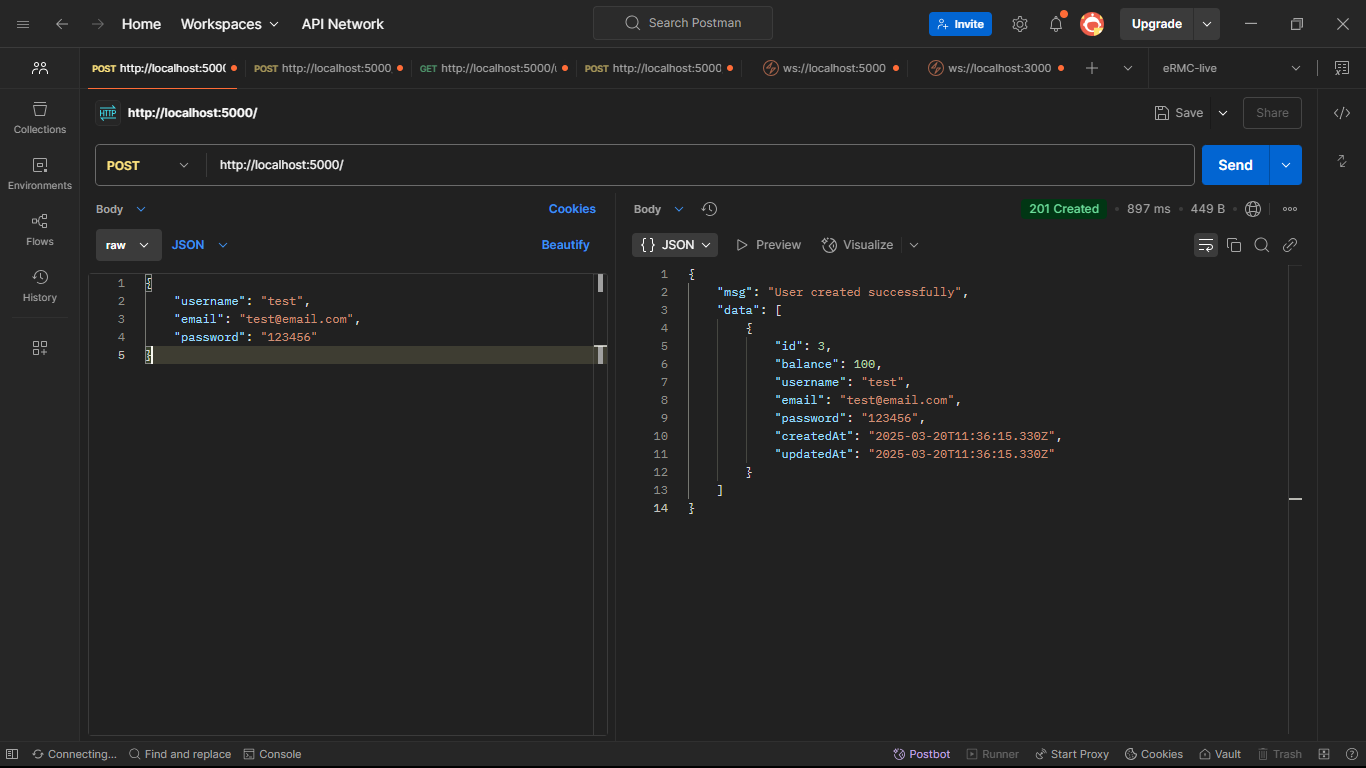
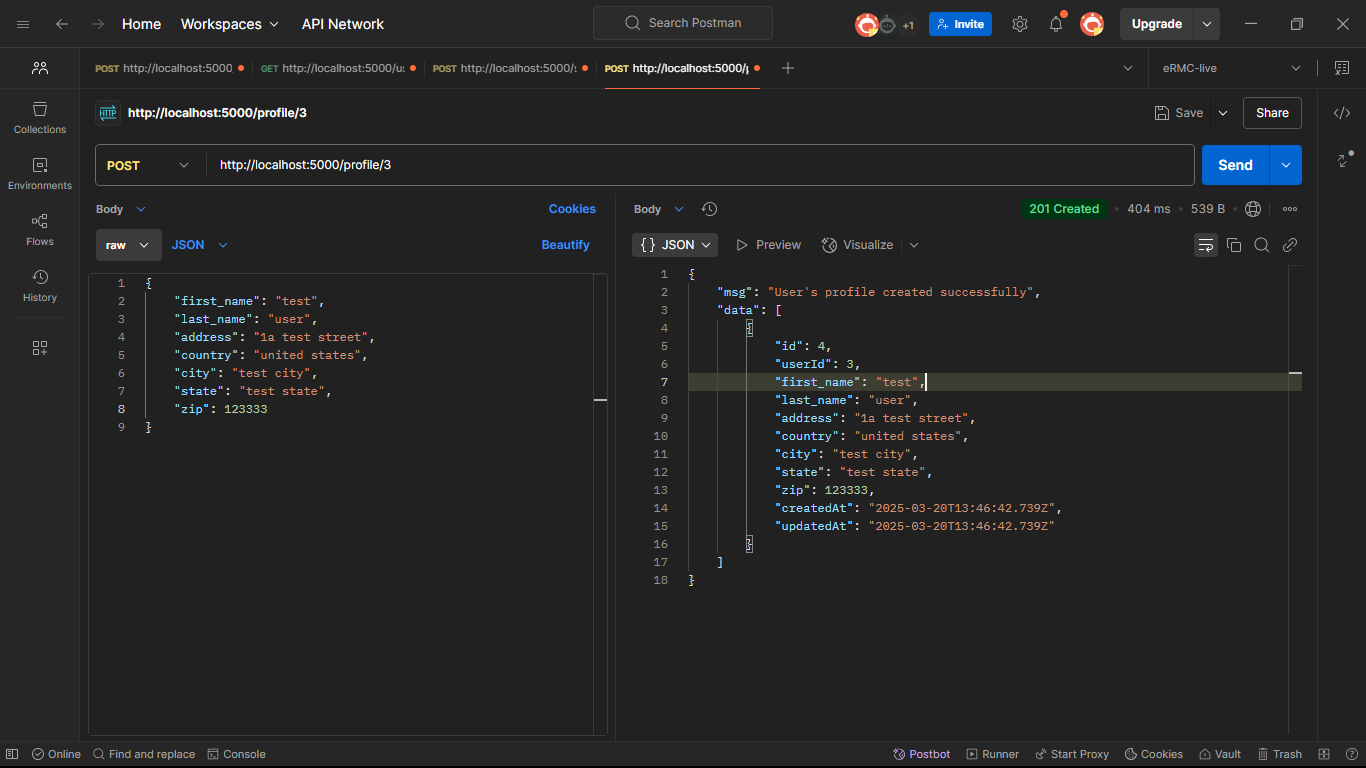
The first post endpoint inserts the user records into the userTable table. The second post endpoint inserts the user's
profile data. As earlier mentioned, it's clear that drizzle has an SQL-like syntax. Call the endpoint on Postman.
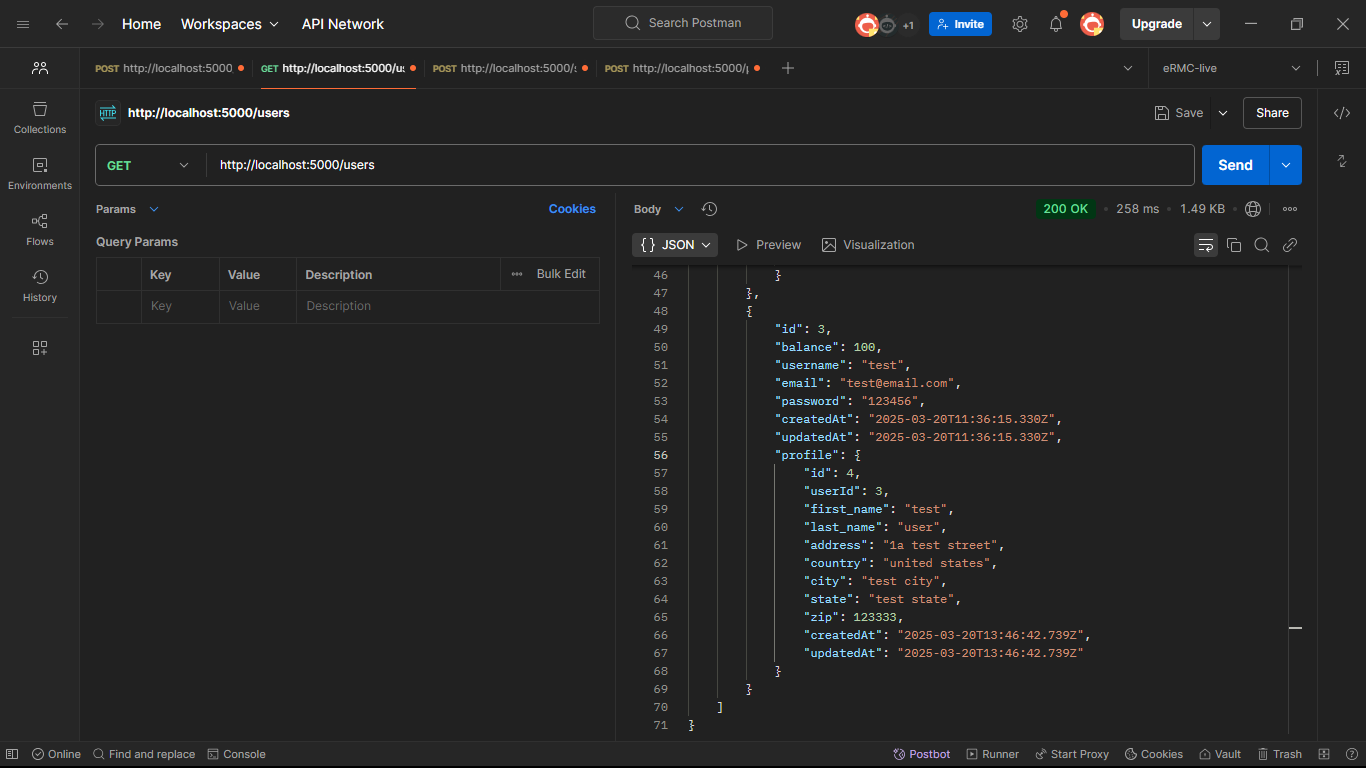
Using drizzle's relational query lets you fetch all the users together with their profiles.
app.get("/users", async (req: Request, res: Response) => {
    try {
        const user = await db.query.userTable.findMany({
            with: {
                profile: true,
            },
        });
        res.status(200).json({msg: "Users with profile returned successfully", data: user});
    } catch (e) {
        console.log(e);
        res.status(400).json(e);
    }
});
Relational queries provide good developer experience for querying nested relational data from
an SQL database, avoiding multiple joins and complex data mappings.
app.post("/send/:sender/:receiver", async (req: Request, res: Response) => {
    const {sender, receiver} = req.params;
    const {amount, transactionType} = req.body;
    try {
        const trx = await db
            .insert(transactions)
            .values({
                amount,
                sender,
                receiver,
                transactionType,
            })
            .returning();
        await db
            .update(userTable)
            .set({balance: sql`${userTable.balance} + ${amount}`})
            .where(eq(userTable.id, Number(receiver)));
        res.status(201).json({msg: "Transaction successful", data: trx});
    } catch (e) {
        res.status(400).json(e);
    }
});
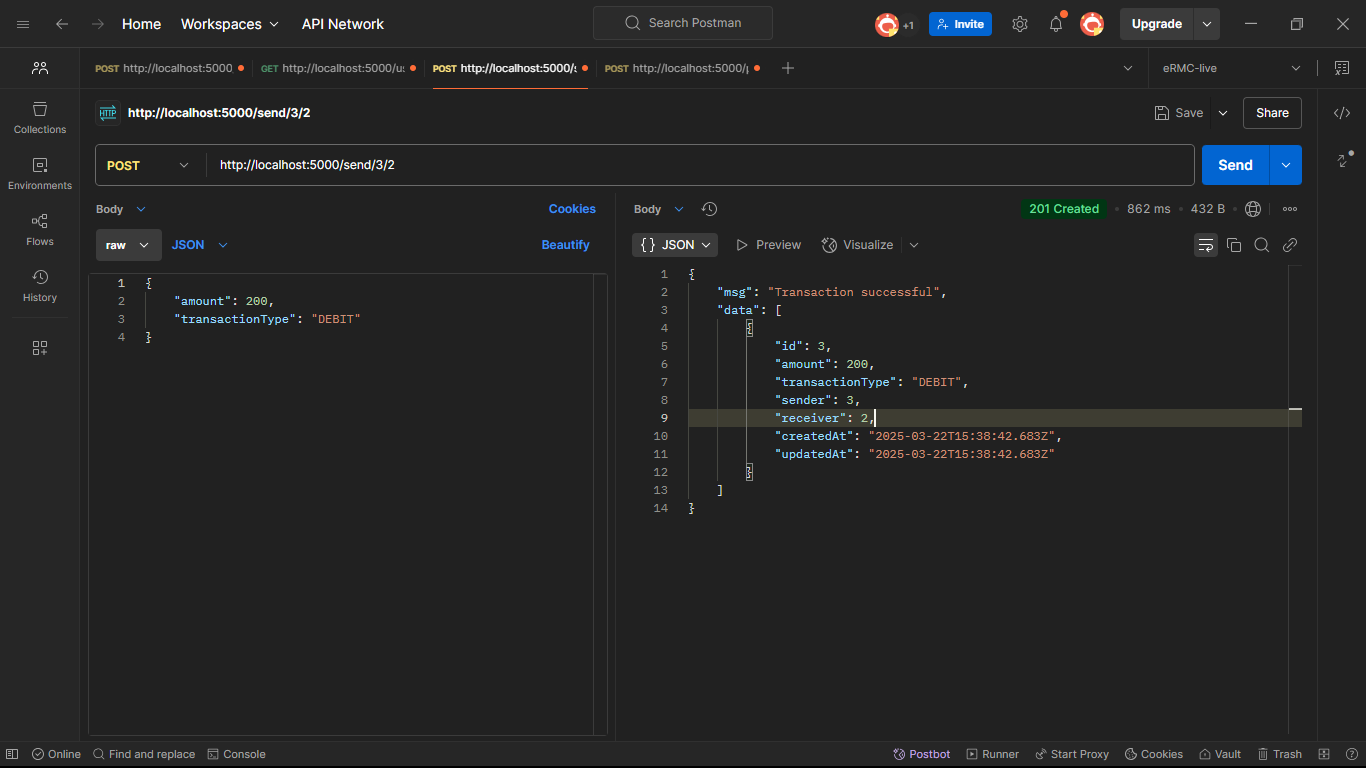
This is the endpoint where one user can transact with another user; the sender's and receiver's IDs are destructured
from the req.params object. The database stores the transaction details, which are the amount and
the transactionType destructured from the request body. After the transaction is made, the receiver's balance is
updated accordingly.
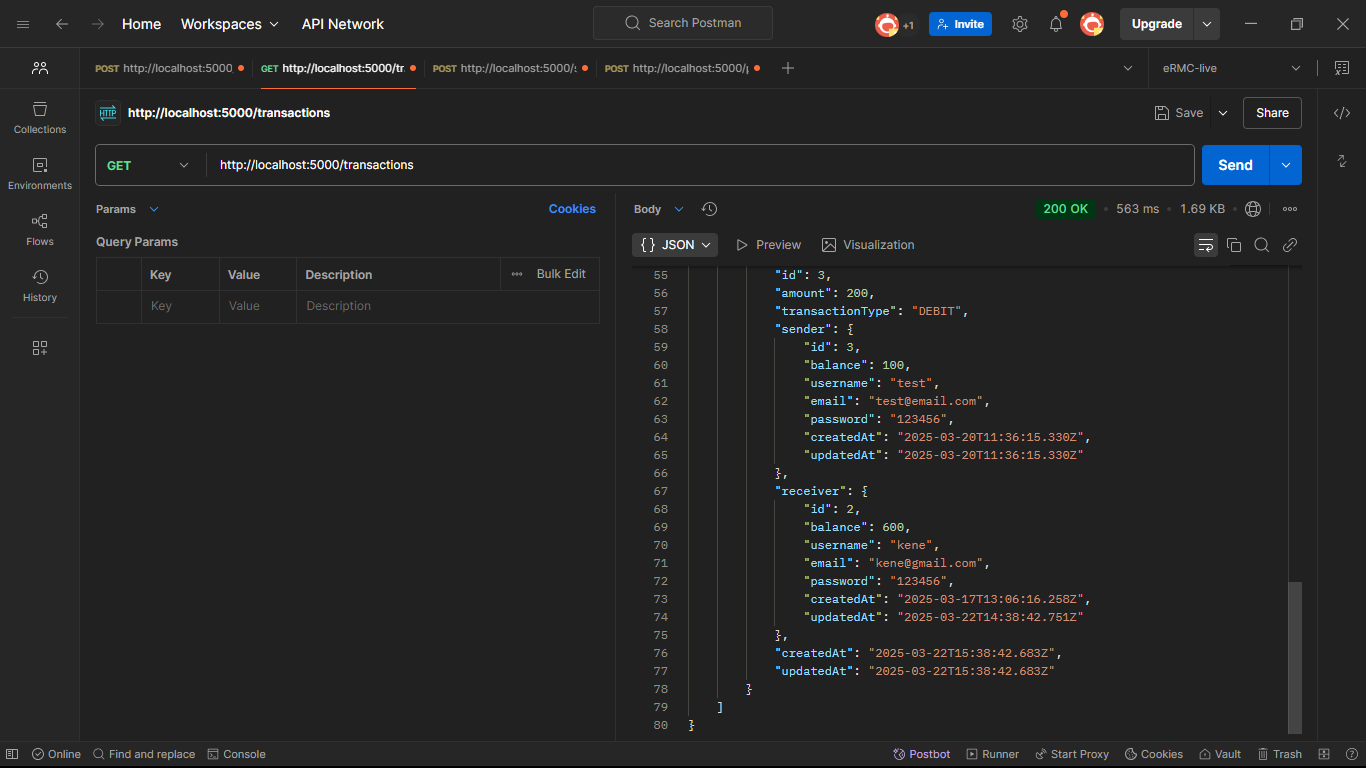
 To fetch all transactions with the users involved in each transaction(sender and receiver), drizzle's relational query
is used, the
To fetch all transactions with the users involved in each transaction(sender and receiver), drizzle's relational query
is used, the sender and the receiver are set to true inside the with object.
app.get("/transactions", async (req: Request, res: Response) => {
    try {
        const transactions = await db.query.transactions.findMany({
            with: {
                receiver: true,
                sender: true,
            },
        });

        res
            .status(200)
            .json({msg: "All transactions returned successfully", data: transactions});
    } catch (e) {
        console.log(e);
        res.status(400).json(e);
    }
});
 To delete a particular transaction, we use filters and conditions to get to that particular transaction.
app.delete("/transaction/:id", async (req, res) => {
    const {id} = req.params;
    try {
        const trx = await db
            .delete(transactions)
            .where(eq(transactions.id, id))
            .returning();
        res
            .status(200)
            .json({msg: "User's transactions deleted successfully", data: trx});
    } catch (e) {
        console.log(e);
        res.status(400).json(e);
    }
});
Calling the delete method on the /transaction/:id endpoint, the eq() filter is now used to find the particular
transaction that matches the id.
Drizzle supports all dialect specific filters and conditional operators. These filters can be imported
from drizzle-orm
package.
import {asc, desc, eq, or} from "drizzle-orm";
Conclusion
Drizzle is a lightweight ORM that offers a typesafe way to interact with SQL databases. The SQL-like query syntax makes
it easy for developers who already know SQL to pick it up; it also offers relational querying, which makes it easy to
query related data. Hope you found this tutorial helpful.
HAPPY CODING


